To make smarter ergonomic choices, start by prioritizing your body’s natural needs, focusing on proper posture, support, and adjustability. Avoid marketing hype by researching product standards and verifying true ergonomic features. Look for designs that promote comfortable movement and personalized fit, rather than superficial appeal. This approach guarantees long-term health, comfort, and productivity. Keep exploring these principles, and you’ll discover how to choose workspace tools that genuinely support your well-being.
Key Takeaways
- Prioritize ergonomic principles like proper posture and support over superficial features or marketing claims.
- Evaluate product design for adjustability and alignment with natural body positioning.
- Test comfort during actual use, ensuring accommodation for individual body shapes and long-term support.
- Rely on scientific research and reputable reviews rather than hype or buzzwords.
- Choose tools that promote health, comfort, and productivity for sustained ergonomic benefits.

Have you ever wondered how to make the most informed and efficient choices when purchasing ergonomic products? It’s a smart question, especially with so many options that seem to promise instant relief or peak productivity. Instead of falling for hype or trendy gadgets, you should prioritize understanding the principles behind ergonomic design and how they directly impact user comfort. When you start with this foundation, your decisions become clearer and more tailored to your needs.
Prioritize understanding ergonomic principles to make smarter, lasting choices that enhance comfort and productivity.
The first step is to evaluate the ergonomic design of the products you’re considering. Look beyond flashy features or aggressive marketing and ask yourself if the item promotes proper posture, reduces strain, and supports your body’s natural alignment. For example, an ergonomic chair should allow you to sit with your feet flat on the floor, knees at a 90-degree angle, and your back well-supported. Check if the design encourages movement and adjustability, since static positions can lead to discomfort over time. By focusing on these principles, you ensure that your investment aligns with genuine ergonomic standards rather than superficial appeal.
Next, consider user comfort as a primary criterion. Comfort isn’t just about feeling good initially; it’s about sustained ease of use during long hours of work or activity. Does the product accommodate your body’s unique shape and size? Does it allow for easy adjustments so you can customize it to fit your posture? For instance, an ergonomic keyboard should have a natural wrist position and key placement that minimizes strain. If a product feels awkward or causes discomfort early on, it defeats the purpose of ergonomic design. Comfort should be tested through actual use, not just by reading specifications or reviews. Additionally, understanding the importance of ergonomic principles can help you make more informed choices that prioritize your well-being. Recognizing the body’s natural alignment is crucial in selecting products that support long-term comfort and health.
Avoid the trap of shopping based on hype or buzzwords. Many products are marketed as “ergonomic,” but they may not truly support your body or promote user comfort. Instead, do your research: read reputable reviews, test products when possible, and prioritize those that adhere to ergonomic principles. Remember, the goal isn’t to get the latest gadget but to select tools that genuinely improve your well-being and productivity over time. Developing a clear understanding of ergonomic design can help you distinguish quality products from superficial ones. Being aware of scientific research about ergonomics ensures you make decisions grounded in evidence rather than marketing claims.
Ultimately, the ergonomic buying order isn’t about chasing the newest trend but about understanding what your body needs and choosing products that align with sound ergonomic design and user comfort. When you approach your selections with this mindset, you’ll make smarter choices that provide lasting benefits, rather than fleeting satisfaction from hype. This method ensures your investments genuinely support your health, comfort, and efficiency, making your workspace or activity more pleasant and sustainable.

Ergonomic Office Chair with Adjustable Lumbar Support, 3D Arms and Headrest, High Back Wide Desk Computer Chair with Wheels, for Home & Office, Black
- High-Density Foam Cushion: Supports posture and resists sagging
- Adjustable Lumbar Support: Customize for optimal back comfort
- 3D Adjustable Headrest: Supports neck and head
As an affiliate, we earn on qualifying purchases.
As an affiliate, we earn on qualifying purchases.
Frequently Asked Questions
How Do I Assess My Own Ergonomic Needs Effectively?
To assess your ergonomic needs effectively, start with a personal assessment of your daily posture and comfort habits. Pay attention to any discomfort or pain during work or leisure activities. Increase your ergonomic awareness by observing how your body interacts with your workspace, noting areas of tension or strain. Use these insights to identify specific adjustments or ergonomic tools that could improve your posture, support, and overall comfort, making your setup truly tailored to you.
What Common Ergonomic Mistakes Should I Avoid?
Avoid ergonomic myths like believing perfect posture is always necessary, as it can lead to unnecessary strain. Don’t fall for posture misconceptions that suggest static positioning is ideal; instead, stay flexible and adjust regularly. Steer clear of over-relying on gadgets or cushions that promise instant relief. Focus on ergonomic principles backed by science, and remember, comfort and movement are key. Proper setup and awareness help prevent discomfort and injuries.
How Often Should Ergonomic Equipment Be Replaced?
You should replace ergonomic equipment every 3 to 5 years, as ergonomic myths often lead you to overlook wear and tear. Regularly assess your setup, and don’t wait for discomfort to prompt a purchase. Proper purchase timing guarantees you’re using equipment that supports your health effectively. Staying proactive helps prevent ergonomic issues and maximizes your investment, rather than falling for hype or outdated advice.
Are There Budget-Friendly Ergonomic Options Available?
Did you know that ergonomic equipment can improve productivity by up to 17%? Yes, budget-friendly tips exist for finding affordable alternatives. You don’t need to spend a fortune to enhance comfort; look for adjustable chairs or supportive cushions, which often cost less but still provide good ergonomics. Focus on key features like proper lumbar support and adjustable height, making your workspace healthier without breaking the bank.
How Can I Customize Ergonomic Solutions for Unique Workspaces?
You can customize ergonomic solutions by making personalized adjustments to your equipment, ensuring it fits your unique workspace. Consider modular furniture or adjustable accessories that accommodate workspace variability. Measure your desk height, monitor position, and chair support needs to tailor your setup. By focusing on these personalized adjustments, you create an ergonomic environment that promotes comfort and productivity, even if your workspace has specific constraints or irregularities.

Perixx PERIBOARD-512B Wired Ergonomic Keyboard – Split Keyboard, Wrist Rest, Natural Typing – Wired USB Connectivity – US English – Black
- Split Ergonomic Layout: Reduces wrist strain with split design
- Responsive Tactile Keys: Long travel and tactile feedback
- Durable Key Switches: Up to 20 million keystrokes
As an affiliate, we earn on qualifying purchases.
As an affiliate, we earn on qualifying purchases.
Conclusion
So, next time you rush to buy the latest gadget or trendy chair, remember this simple order. It’s ironic how easily we get caught up in hype, ignoring what truly matters—our comfort and health. But hey, who needs ergonomic wisdom when you can chase fleeting trends? Just don’t be surprised if your “smart” purchase turns into a painful mistake. Sometimes, the best choice is the one that makes the least noise—silence your hype and prioritize yourself.
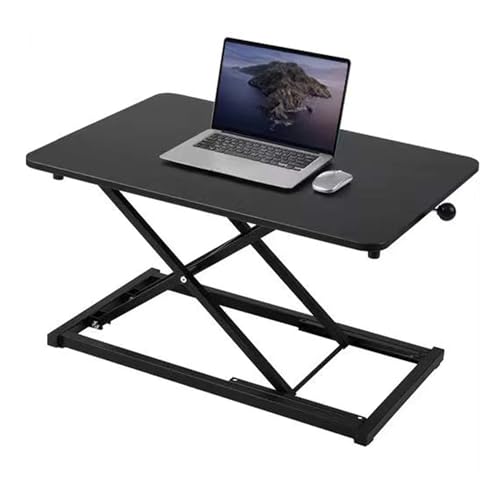
Raathionty Height Adjustable Standing Desk Converter, Computer Keyboard Stand for Desktop, Keyboard Riser for Stand Up Desk Riser, Ergonomic Sit Stand Workstations for Home Office
- Desktop Dimensions: 13.3 x 23.6 inches
- No Assembly Needed: Ready to use out of the box
- Scratch-Resistant Surface: Easy to clean and maintain
As an affiliate, we earn on qualifying purchases.
As an affiliate, we earn on qualifying purchases.

CasaZenith Foot Rest, Six Heights Adjustable Foot Rest for Under Desk at Work, Ergonomic Foots Stool for Under Office Desks, Under Desk Footrest with Foot Massage Roller, Chair Footrest for Leg Rests
- Six Adjustable Heights: Customizable for ergonomic comfort
- Ergonomic Design: Supports proper sitting posture
- Reduces Back Stress: Helps relieve back pain and fatigue
As an affiliate, we earn on qualifying purchases.
As an affiliate, we earn on qualifying purchases.